Introduction
Cloud computing provides businesses with different ways to access technology without purchasing and maintaining all the required infrastructure themselves. The three main cloud service models are IaaS, PaaS, and SaaS.
Although these models all use cloud technology, they offer different levels of control, management, and responsibility.
Understanding the difference between IaaS vs PaaS vs SaaS helps businesses choose the right cloud solution for their applications, development needs, and daily operations.
What Is IaaS?
IaaS stands for Infrastructure as a Service.
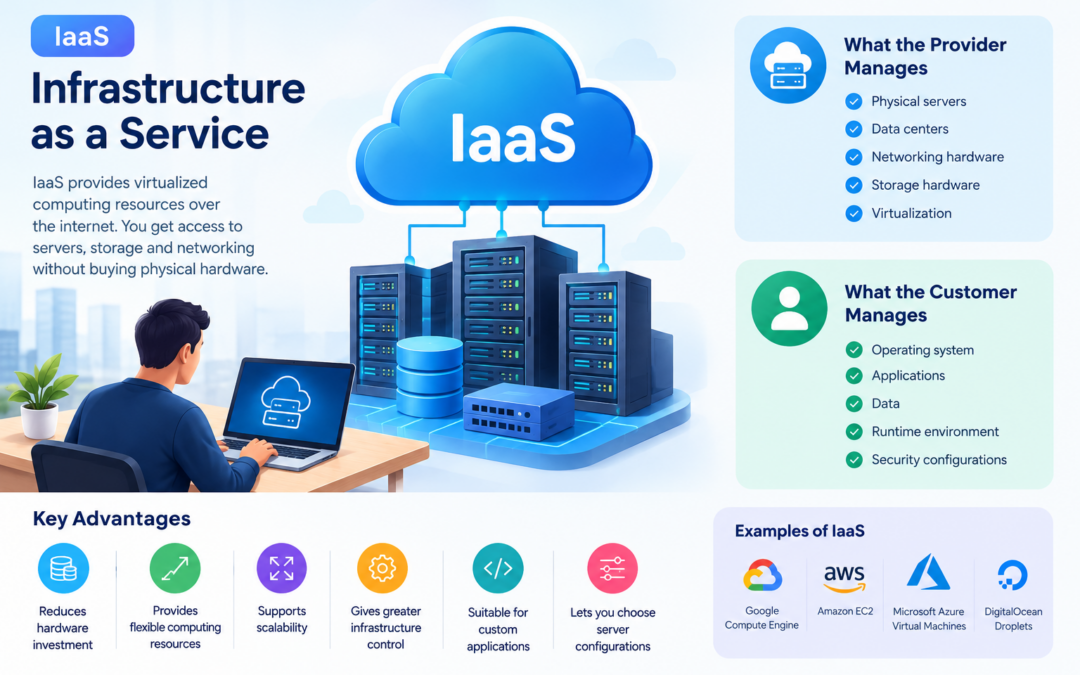
IaaS provides virtualized computing infrastructure over the internet. Businesses can rent resources such as servers, storage, and networking instead of purchasing physical hardware.

The cloud provider manages the physical infrastructure, while the customer manages the operating system, applications, and data.
Examples of IaaS
- Google Compute Engine
- Amazon EC2
- Microsoft Azure Virtual Machines
- DigitalOcean Droplets
What the provider manages
- Physical servers
- Data centers
- Networking hardware
- Storage hardware
- Virtualization
What the customer manages
- Operating system
- Applications
- Data
- Runtime environment
- Security configurations
Advantages of IaaS
- Reduces hardware investment
- Provides flexible computing resources
- Supports scalability
- Offers greater infrastructure control
- Suitable for custom applications
- Allows businesses to select server configurations
Example of IaaS
A company needs a server to host its business application. Instead of buying a physical server, it rents a virtual machine from Google Cloud or AWS and installs the required operating system and software.
What Is PaaS?
PaaS stands for Platform as a Service.
PaaS provides a ready-to-use cloud environment for developing, testing, deploying, and managing applications.

The cloud provider manages the infrastructure and operating system. Developers can focus mainly on writing application code instead of maintaining servers.
Examples of PaaS
- Google App Engine
- Google Cloud Run
- Heroku
- AWS Elastic Beanstalk
- Microsoft Azure App Service
What the provider manages
- Physical infrastructure
- Servers
- Storage
- Networking
- Operating system
- Runtime environment
- Platform updates
What the customer manages
- Application code
- Application data
- Application settings
- User access
Advantages of PaaS
- Speeds up application development
- Reduces server management
- Simplifies deployment
- Supports collaboration between developers
- Provides built-in scalability
- Reduces infrastructure maintenance
Example of PaaS
A development team wants to build and deploy a web application. Instead of configuring servers manually, the team uses a PaaS platform to upload code and deploy the application quickly.
What Is SaaS?
SaaS stands for Software as a Service.
SaaS provides complete software applications over the internet. Users usually access the software through a web browser or mobile application.

The cloud provider manages the infrastructure, operating system, application, updates, and security of the service.
SaaS applications such as Google Workspace can help businesses reduce infrastructure management and improve productivity. Read more about Google Workspace.
Examples of SaaS
- Google Workspace
- Microsoft 365
- Salesforce
- Slack
- Dropbox
- Zoom
- Canva
What the provider manages
- Physical infrastructure
- Servers
- Storage
- Networking
- Operating system
- Application
- Updates
- Maintenance
- Security of the platform
What the customer manages
- User accounts
- Access permissions
- Business data
- Application settings
Advantages of SaaS
- No installation is usually required
- Accessible from different devices
- Automatic updates
- Easy collaboration
- Lower maintenance responsibility
- Subscription-based pricing
- Quick implementation
Example of SaaS
A business uses Google Workspace for Gmail, Google Drive, and Google Docs. The business does not need to install or maintain the underlying servers or software.
IaaS vs PaaS vs SaaS: Main Differences
| Feature | IaaS | PaaS | SaaS |
|---|---|---|---|
| Full form | Infrastructure as a Service | Platform as a Service | Software as a Service |
| Main purpose | Provides infrastructure | Provides application development platform | Provides ready-to-use software |
| User control | High | Medium | Low |
| Provider manages | Physical infrastructure | Infrastructure and platform | Almost the entire application environment |
| Customer manages | OS, applications, and data | Application code and data | Users, settings, and data |
| Technical knowledge required | High | Medium | Low |
| Maintenance responsibility | Mostly customer | Shared | Mostly provider |
| Best suited for | IT teams and system administrators | Developers | End users and businesses |
| Example | Amazon EC2 | Google App Engine | Google Workspace |
Understanding the Difference with a Simple Example
Imagine you want to run a restaurant.
IaaS: Renting a kitchen
You rent a kitchen and manage most of the cooking equipment, ingredients, recipes, and cooking process.
This is similar to IaaS because you receive the infrastructure but manage the operating system, applications, and data.
PaaS: Using a managed kitchen
You receive a ready-to-use kitchen with equipment and basic facilities. You mainly focus on preparing the food.
This is similar to PaaS because the provider manages the infrastructure and platform while developers focus on application development.
SaaS: Ordering a prepared meal
You simply order and use the finished meal. You do not manage the kitchen or cooking process.
This is similar to SaaS because users access complete software without managing the infrastructure or application maintenance.
Responsibility Model
The main difference between IaaS, PaaS, and SaaS is how responsibilities are divided between the cloud provider and the customer.
| Responsibility | IaaS | PaaS | SaaS |
|---|---|---|---|
| Data center | Provider | Provider | Provider |
| Physical network | Provider | Provider | Provider |
| Storage hardware | Provider | Provider | Provider |
| Virtualization | Provider | Provider | Provider |
| Operating system | Customer | Provider | Provider |
| Runtime | Customer | Provider | Provider |
| Application | Customer | Customer | Provider |
| Data | Customer | Customer | Customer |
| User access | Customer | Customer | Customer |
The exact responsibilities may vary depending on the cloud provider and service configuration.
When Should You Choose IaaS?
IaaS may be suitable when your business needs:
- Full control over virtual machines
- Custom operating systems
- Specific software configurations
- Flexible infrastructure
- Migration of existing applications
- Control over networking and storage
- A replacement for physical servers
IaaS is often used by system administrators, IT teams, and businesses running customized applications.
When Should You Choose PaaS?
PaaS may be suitable when your business needs:
- Faster application development
- Simple application deployment
- Reduced server management
- Built-in development tools
- Automatic scaling
- Collaboration between developers
- Support for modern application development
PaaS is especially useful for software development teams that want to focus on coding rather than infrastructure management.
When Should You Choose SaaS?
SaaS may be suitable when your business needs:
- Ready-to-use software
- Easy access from anywhere
- Minimal technical maintenance
- Automatic software updates
- Collaboration tools
- Subscription-based services
- Fast implementation
SaaS is commonly used for email, accounting, customer relationship management, communication, file storage, and productivity tools.
Benefits of Using Cloud Service Models
Reduced Infrastructure Costs
Businesses can avoid purchasing and maintaining large amounts of physical hardware.
Flexible Scalability
Cloud resources can be increased or reduced according to business requirements.
Faster Deployment
Cloud services can often be deployed faster than traditional infrastructure.
Improved Accessibility
Cloud applications and services can be accessed from different locations and devices.
Reduced Maintenance
Cloud providers manage many infrastructure and software maintenance tasks.
Limitations of IaaS, PaaS, and SaaS
IaaS limitations
- Requires technical knowledge
- Customers manage operating systems and applications
- Security configuration can be complex
- Poor resource management may increase costs
PaaS limitations
- Less control over the underlying infrastructure
- Platform restrictions may affect application design
- Moving to another provider may require changes
- Service availability depends on the provider
SaaS limitations
- Limited customization
- Dependence on the service provider
- Requires internet access
- Data and access are managed through the provider’s platform
- Subscription costs may increase over time
Can Businesses Use All Three Models?
Yes. A business can use IaaS, PaaS, and SaaS at the same time.
For example:
- IaaS: Virtual machines host a custom business application.
- PaaS: Developers use a platform to build and deploy new applications.
- SaaS: Employees use Google Workspace for email and collaboration.
The three models can work together to support different business requirements.
Conclusion
IaaS, PaaS, and SaaS are three important cloud computing service models.
- IaaS provides infrastructure and gives customers greater control.
- PaaS provides a development platform and reduces infrastructure management.
- SaaS provides complete software that users can access through the internet.
The right choice depends on your business goals, technical expertise, customization needs, budget, and level of control required. Understanding IaaS vs PaaS vs SaaS helps businesses select cloud services more effectively.
Frequently Asked Questions
What is the main difference between IaaS, PaaS, and SaaS?
IaaS provides infrastructure, PaaS provides a platform for application development, and SaaS provides complete software applications.
Which cloud model provides the most control?
IaaS generally provides the most control because customers manage the operating system, applications, and data.
Which cloud model is easiest for non-technical users?
SaaS is usually the easiest because users access ready-to-use software without managing infrastructure or application maintenance.
Is Google Workspace SaaS?
Yes. Google Workspace is a SaaS solution because users access complete applications such as Gmail, Google Drive, and Google Docs through the internet.
Is Google App Engine a PaaS service?
Yes. Google App Engine is a PaaS service that allows developers to deploy applications without managing the underlying servers.
Is Amazon EC2 an IaaS service?
Yes. Amazon EC2 provides virtual computing infrastructure that customers can configure and manage.
Which model is best for software developers?
PaaS is often useful for developers because it provides a ready-to-use environment for building, testing, and deploying applications.
Can cloud service models reduce IT costs?
Yes. They can reduce hardware purchases, maintenance work, and infrastructure management costs. However, businesses must monitor usage and choose services carefully.