
Introduction
Cloud migration can help businesses improve scalability, flexibility, security, and IT efficiency. However, moving applications and data to the cloud without proper preparation can lead to unexpected costs, downtime, security issues, and data loss.
A clear cloud migration checklist helps businesses understand their current infrastructure, prepare their employees, protect important data, and plan the migration process successfully.
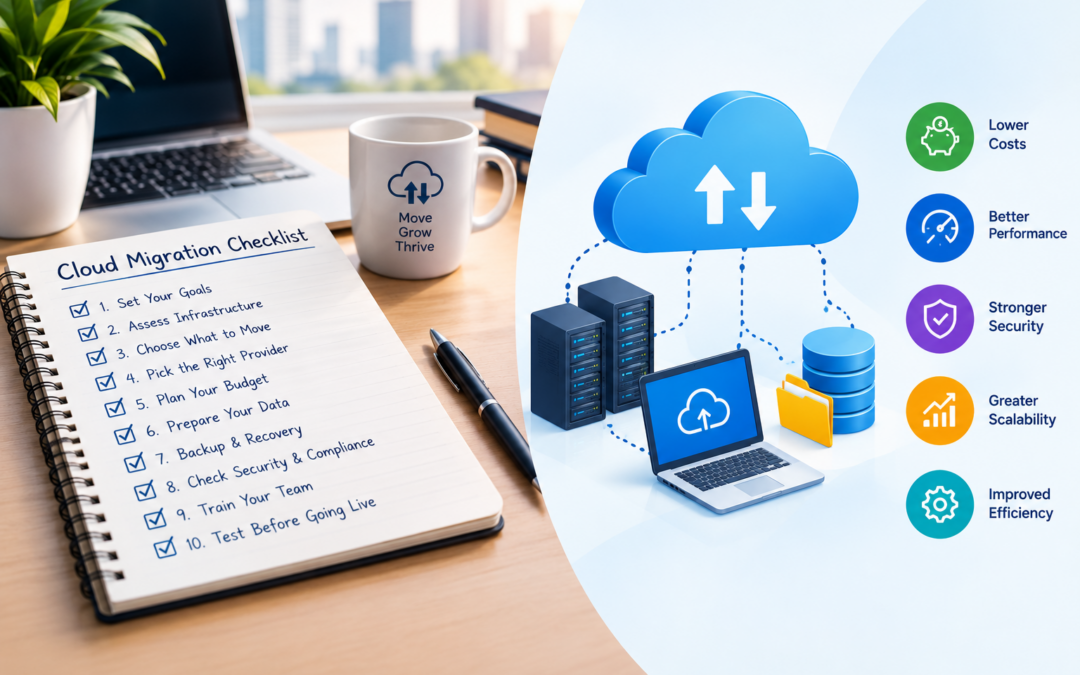
Before moving to the cloud, businesses should complete the following ten preparation steps.

Define Your Cloud Migration Goals
Businesses can learn more about Google Cloud migration before selecting a cloud strategy. The first step is to understand why your business wants to migrate to the cloud.
Common goals include:
- Reducing IT infrastructure costs
- Improving application performance
- Supporting remote work
- Increasing scalability
- Improving data backup and recovery
- Strengthening security
- Replacing outdated hardware
- Improving business continuity
Clearly defined goals help your business choose the right cloud services and measure the success of the migration.
Checklist
- Identify the main reason for migration.
- Define business and technical goals.
- Decide how success will be measured.
- Set a realistic migration timeline.
Assess Your Existing IT Infrastructure
Before moving anything, create an inventory of your current IT environment.
Review:
- Physical and virtual servers
- Applications
- Databases
- Storage systems
- Network equipment
- Operating systems
- Software licenses
- Business-critical services
- Existing backup systems
This assessment helps you understand what should be migrated, upgraded, replaced, or retired.
Checklist
- List all applications and servers.
- Identify outdated systems.
- Record software and hardware dependencies.
- Identify systems that cannot be moved immediately.
- Document current performance and usage.
Identify Which Workloads to Migrate
Not every application needs to move to the cloud at the same time.
Classify workloads into different groups:
- Migrate now: Applications ready for cloud deployment.
- Modernize first: Applications requiring code or architecture changes.
- Retain: Systems that must remain on-premises.
- Retire: Unused or outdated applications.
- Replace: Applications that can be replaced with cloud-based software.
This approach helps reduce risk and prevents unnecessary migration work.
Choose the Right Cloud Provider
Compare cloud providers based on your business requirements.
Important factors include:
- Pricing
- Available services
- Security features
- Compliance support
- Data-center locations
- Performance
- Availability
- Technical support
- Backup and disaster recovery options
- Integration with existing systems
You may compare providers such as Google Cloud, AWS, and Microsoft Azure before making a decision.
The right provider should support your current needs and future growth.
Create a Migration Budget
Cloud migration involves more than monthly cloud service charges. Your budget should include both initial and ongoing expenses.
Consider:
- Cloud computing costs
- Storage costs
- Data transfer charges
- Migration tools
- Consulting services
- Application updates
- Security configuration
- Employee training
- Testing
- Backup and disaster recovery
- Technical support
Also estimate the cost of running cloud resources after migration.
Checklist
- Estimate migration expenses.
- Calculate expected monthly cloud costs.
- Include training and support costs.
- Set a budget limit.
- Create a plan for monitoring cloud expenses.
Prepare Your Data
Data preparation is one of the most important steps in cloud migration.
Before transferring data:
- Remove duplicate files.
- Delete unnecessary data.
- Archive old information.
- Classify sensitive data.
- Check data quality.
- Confirm storage requirements.
- Identify data that must remain in a specific location.
Organized data can reduce transfer time, storage costs, and migration complexity.
You should also decide how data will be transferred, such as through secure network connections, migration tools, or physical data-transfer devices.
Create a Backup and Disaster Recovery Plan
Always create a complete backup before beginning migration.
Your backup plan should include:
- A full backup of important data
- Application configuration backups
- Database backups
- Backup verification
- Off-site backup storage
- Recovery testing
- A rollback plan
A rollback plan explains how your business will return to the previous environment if the migration fails.
Do not assume that data is safe simply because it is being moved to the cloud. Verify that backups can actually be restored.
Review Security and Compliance Requirements
Cloud migration should follow your organization’s security and compliance requirements.
Review:
- User access permissions
- Password policies
- Multi-factor authentication
- Data encryption
- Firewall rules
- Network security
- Logging and monitoring
- Data privacy requirements
- Industry regulations
- Third-party access
Use the principle of least privilege, which means users should receive only the access they need to perform their work.
Sensitive data should be encrypted during transfer and while stored in the cloud.
Prepare Your Employees and IT Team
Cloud migration changes the way employees use applications and infrastructure. Employees should understand what is changing and how the new environment will work.
Provide training on:
- Cloud-based applications
- New login procedures
- Security practices
- Data access
- File sharing
- Backup procedures
- Incident reporting
- Cloud cost awareness
Your IT team may also need training in cloud administration, monitoring, security, automation, and troubleshooting.
Good communication can reduce confusion and improve user adoption.
Test the Migration Before Going Live
Before moving all workloads, test the migration with a small, non-critical application or limited group of users.
Testing should verify:
- Application functionality
- Data accuracy
- Performance
- Security settings
- User access
- Network connectivity
- Backup and recovery
- Integration with other systems
- Downtime requirements
After testing, document the results and fix any issues before the full migration.
A pilot migration helps identify problems early and reduces the risk of business disruption.

Cloud Migration Checklist Summary
| No. | Preparation Task | Purpose |
|---|---|---|
| 1 | Define migration goals | Establish clear objectives |
| 2 | Assess existing infrastructure | Understand current systems |
| 3 | Identify workloads | Decide what to migrate or retain |
| 4 | Choose a cloud provider | Select suitable services |
| 5 | Create a migration budget | Control costs |
| 6 | Prepare data | Reduce transfer risks and storage waste |
| 7 | Plan backup and recovery | Protect business information |
| 8 | Review security and compliance | Protect systems and meet regulations |
| 9 | Train employees and IT staff | Support smooth adoption |
| 10 | Test before going live | Identify and fix problems early |
Additional Tips for a Successful Cloud Migration
Start with a small project
Begin with a low-risk application or non-critical workload. This allows your team to learn before migrating important systems.
Document everything
Maintain records of:
- Existing infrastructure
- Migration steps
- Configuration changes
- Access permissions
- Testing results
- Recovery procedures
Monitor performance and costs
After migration, monitor cloud usage, application performance, security alerts, and monthly expenses.
Plan for ongoing optimization
Cloud migration is not the end of the process. Businesses should regularly review resources, remove unused services, improve security, and optimize costs.
Conclusion
A successful cloud migration requires careful preparation. By defining clear goals, assessing existing infrastructure, preparing data, reviewing security, creating backups, training employees, and testing workloads, businesses can reduce migration risks and avoid unexpected problems.
Use this cloud migration checklist before moving to the cloud to create a more organized, secure, and cost-efficient migration plan.
Frequently Asked Questions
What is a cloud migration checklist?
A cloud migration checklist is a list of tasks businesses should complete before moving applications, data, and IT infrastructure to a cloud platform.
Why is preparation important before cloud migration?
Preparation helps businesses reduce downtime, protect data, control costs, identify risks, and ensure that applications work properly after migration.
Should all applications be migrated to the cloud?
No. Some applications may need to remain on-premises because of security, compliance, performance, or technical requirements.
How can businesses protect data during cloud migration?
Businesses should create verified backups, use secure data-transfer methods, encrypt sensitive information, and test data recovery before migration.
What should businesses do after cloud migration?
After migration, businesses should monitor performance, review cloud costs, check security settings, train users, and optimize cloud resources regularly.