Introduction
Businesses today need reliable technology to host websites, store data, run applications, and support digital services. Traditional physical servers can be expensive to purchase, maintain, and upgrade.
Google Cloud Platform, commonly called GCP, provides cloud computing services that help businesses use computing resources over the internet. Instead of managing all infrastructure themselves, businesses can use Google’s cloud services according to their requirements.
In this guide, we explain what is Google Cloud Platform, how it works, its main services, benefits, pricing, and common business uses.
What Is Google Cloud Platform?
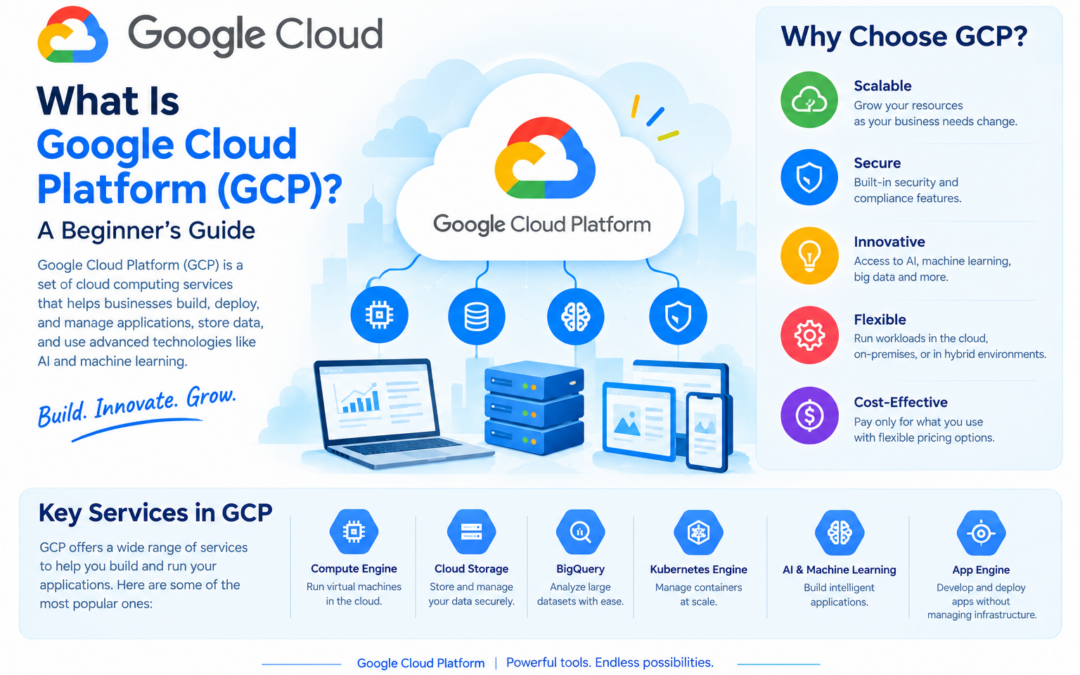
Google Cloud Platform is a collection of cloud computing services provided by Google.
It allows businesses, developers, and organizations to use resources such as:
- Virtual machines
- Cloud storage
- Databases
- Networking
- Data analytics
- Artificial intelligence
- Application development tools
- Security and monitoring services

GCP runs on Google’s global infrastructure and helps organizations build, deploy, and manage applications without purchasing and maintaining physical servers.
How Does Google Cloud Platform Work?
Google Cloud provides computing resources through the internet. Users can select the services they need through the Google Cloud Console, command-line tools, or application programming interfaces.
For example, a business can:
- Create a virtual server using Compute Engine.
- Store files using Cloud Storage.
- Host a database using Cloud SQL.
- Deploy an application using Cloud Run.
- Monitor application performance using Google Cloud monitoring tools.
Businesses generally pay based on their usage, although some services also provide subscription or committed-use pricing options.
Main Google Cloud Services
Compute Engine
Compute Engine provides virtual machines that run applications and websites.
Businesses can choose the required:
- Operating system
- CPU
- Memory
- Storage
- Network configuration
Compute Engine is useful when organizations need control over their server environment.
Cloud Storage
Cloud Storage is an object storage service used to store files and data.
It can be used for:
- Website images
- Videos
- Documents
- Backups
- Application files
- Large datasets
Cloud Storage provides scalable storage for businesses with different data requirements.
Google Kubernetes Engine
Google Kubernetes Engine, or GKE, is a managed Kubernetes service.
It helps businesses deploy and manage containerized applications. GKE handles many infrastructure management tasks, allowing development teams to focus more on building and improving their applications.
Cloud SQL
Cloud SQL is a managed relational database service.
It supports popular database systems such as:
- MySQL
- PostgreSQL
- SQL Server
Google manages many administrative tasks, including backups, maintenance, and infrastructure management.
BigQuery
BigQuery is Google Cloud’s data analytics and data warehousing service.
Businesses can use BigQuery to analyze large amounts of data and generate useful insights. It is commonly used for:
- Business intelligence
- Customer analytics
- Sales reports
- Marketing analysis
- Data-driven decision-making
Cloud Run
Cloud Run allows developers to run applications and services without managing traditional servers.
It is useful for deploying containerized applications that can automatically scale according to demand.
Vertex AI
Vertex AI provides tools for developing, deploying, and managing artificial intelligence and machine learning applications.
Businesses can use it for:
- Predictive analytics
- Recommendation systems
- Text analysis
- Image recognition
- Generative AI applications
Cloud Functions
Cloud Functions allows developers to run small pieces of code in response to events without managing servers.
For example, a function can run when:
- A file is uploaded
- A database record changes
- An online form is submitted
- An application event occurs
Benefits of Google Cloud Platform
Scalability
Businesses can increase or decrease computing resources according to demand. This is useful when website traffic or application usage changes.
Cost Efficiency
Businesses do not always need to purchase expensive physical infrastructure. They can pay for the resources and services they use.
However, costs should be monitored carefully because high usage can increase monthly expenses.
Global Infrastructure
Google Cloud provides access to infrastructure in different geographic regions. This helps businesses serve customers from multiple locations and improve application availability.
Security
Google Cloud provides security features such as:
- Identity and access management
- Encryption
- Network security
- Monitoring
- Security logging
- Compliance-related tools
Businesses must still configure their cloud services securely and manage user access properly.
Reliability
Cloud services can provide backup, redundancy, monitoring, and recovery options that help businesses reduce service interruptions.
Managed Services
Managed services reduce the need for businesses to handle every infrastructure task manually. This allows teams to focus more on application development and business operations.
Support for AI and Data Analytics
Google Cloud is widely used for data processing, analytics, machine learning, and artificial intelligence applications.
Common Uses of Google Cloud Platform
Businesses use Google Cloud for many purposes, including:
- Hosting websites and web applications
- Running business software
- Storing files and backups
- Managing databases
- Building mobile and web applications
- Analyzing business data
- Developing AI solutions
- Running containerized applications
- Supporting disaster recovery
- Managing enterprise systems
For example, an e-commerce business can use Compute Engine or Cloud Run to host its website, Cloud SQL to manage customer data, and Cloud Storage to store product images.
Who Can Use Google Cloud?
Google Cloud can be used by:
- Startups
- Small businesses
- Developers
- Educational institutions
- Large enterprises
- Government organizations
- E-commerce businesses
- Technology companies
A small business may use Google Cloud to host a website, while a large organization may use it to manage databases, analytics, applications, and AI workloads.
Google Cloud Platform Pricing
Google Cloud pricing depends on several factors, such as:
- Service type
- Region
- Resource size
- Usage duration
- Storage amount
- Data transfer
- Database configuration
- Support requirements
Businesses should estimate their expected usage before selecting a service. They should also monitor cloud expenses regularly to avoid unexpected costs.
Google Cloud may offer free usage limits or trial credits for eligible users, but availability and terms can change. Businesses should check the official pricing and free-tier information before planning their budget.
Is Google Cloud Platform Secure?
Google Cloud provides many security features, but cloud security is a shared responsibility.
Google is responsible for securing the underlying cloud infrastructure. The customer is responsible for:
- Managing user access
- Creating strong passwords
- Configuring permissions
- Protecting sensitive data
- Updating applications
- Monitoring activity
- Securing networks and workloads
Businesses should follow security best practices and provide access only to authorized users.
Google Cloud Platform vs Traditional Servers
| Feature | Google Cloud Platform | Traditional Servers |
|---|---|---|
| Infrastructure | Cloud-based | Physical hardware |
| Initial investment | Usually lower | Usually higher |
| Scalability | Flexible and quick | Requires hardware upgrades |
| Maintenance | Many tasks managed by provider | Managed by the business |
| Accessibility | Available through the internet | Depends on network setup |
| Pricing | Based on usage or subscription | Hardware and maintenance costs |
| Deployment | Usually faster | May take more time |
How to Get Started with Google Cloud
Beginners can follow these steps:
- Create a Google Cloud account.
- Open the Google Cloud Console.
- Create a new project.
- Enable the required cloud service.
- Select a region and configuration.
- Deploy a simple application or create storage.
- Configure security and user permissions.
- Monitor usage and costs.
- Delete unused resources to avoid unnecessary charges.
Beginners should start with simple services before working with advanced infrastructure.
Google Cloud Platform vs Google Workspace
Google Cloud Platform and Google Workspace are different services.
Google Workspace provides productivity tools such as: Google Workspace
- Gmail
- Google Drive
- Google Docs
- Google Sheets
- Google Meet
- Google Calendar
Google Cloud Platform provides technology services such as: https://cloud.google.com/
- Virtual machines
- Cloud storage
- Databases
- Application hosting
- Data analytics
- Artificial intelligence
Google Workspace is mainly used for business collaboration and productivity, while Google Cloud is used to build, host, and manage applications and infrastructure.
Conclusion
Google Cloud Platform is a powerful cloud computing platform that provides services for computing, storage, databases, networking, analytics, and artificial intelligence.
It helps businesses reduce infrastructure management, scale resources, improve application deployment, and access modern technology services.
The right Google Cloud services depend on an organization’s workload, budget, technical skills, and business goals. With proper planning and security configuration, GCP can support businesses from small websites to large enterprise applications.
Frequently Asked Questions
What does GCP stand for?
GCP stands for Google Cloud Platform.
Is Google Cloud the same as Google Drive?
No. Google Drive is mainly used for personal and business file storage and collaboration. Google Cloud Platform provides infrastructure, databases, application hosting, analytics, and other cloud computing services.
Is Google Cloud suitable for small businesses?
Yes. Small businesses can use Google Cloud for website hosting, file storage, databases, backups, application development, and other services.
Is Google Cloud free?
Google Cloud offers certain free usage limits and trial offers for eligible users. However, many services are chargeable based on usage.
What is the difference between Google Cloud and Google Workspace?
Google Workspace provides productivity tools such as Gmail, Google Drive, Docs, Sheets, and Meet. Google Cloud provides infrastructure and technology services for hosting applications, managing data, and building software.
What is the best Google Cloud service for website hosting?
The best service depends on the website type. Compute Engine, Cloud Run, and other hosting options may be suitable depending on the application requirements and technical setup.